
 Tutorial
How to Install DirectAdmin on CentOS
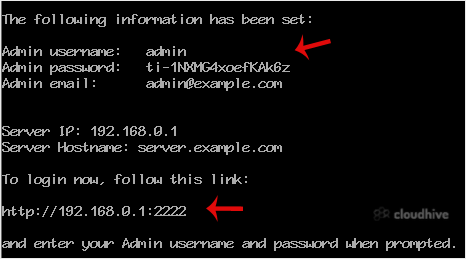
DirectAdmin(DA) is a Commercial Hosting Control Panel used to sell shared and reseller hosting accounts. What are the requirements? - Fresh CentOS, AlmaLinux, Ubuntu, or Debian installed on your VPS/Server. How to install DirectAdmin? Step 1: The first step is to log in to your root account using...
 Tutorial
How to Change the WordPress User's Display Name
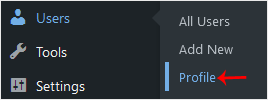
You can change the display name of your WordPress account, which shows on WordPress posts and comments. 1. Log in to the WordPress dashboard.2. From the Dashboard menu, go to Users and click on Profile.3. Locate Nickname and enter your new name.4. From the Display name publicly as, choose your ne...
 Tutorial
How to Forcefully Update or Reinstall a WordPress Plugin
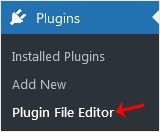
The WordPress plugin is not working correctly, or you want to reinstall it without losing data or removing the plugin.You can do this with both active and inactive plugins.1. Log in to the WordPress dashboard.2. From the Dashboard menu, go to Plugins and click on Plugin File Editor.3. From the dr...
 Tutorial
How to Deactivate and Delete a WordPress Plugin
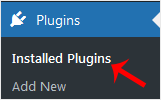
You can deactivate and delete unused plugins from the WordPress dashboard. 1. Log in to the WordPress dashboard. 2. From the Dashboard menu, go to Plugins and click on Installed Plugins. 3. If you want to deactivate the Hello Dolly plugin, click on Deactivate, which appears below the plugin's nam...
 Tutorial
How to Manually Install a WordPress Plugin
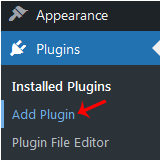
The automatic installation of a plugin is easy and straightforward. However, you can also install it manually. It will involve manually downloading a plugin, uploading, and activating it.Make sure you have already downloaded a zip file of the plugin to your desktop.1. Log in to the WordPress dash...
 Tutorial
How to Delete a WordPress Theme
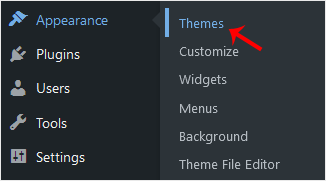
You should remove unused themes. It is considered good practice to protect your WordPress website from vulnerabilities by not keeping old, unused themes.1. Log in to the WordPress dashboard.2. From the Dashboard menu, go to Appearance and click on Themes.3. Hover your mouse on a theme you want to...
Tutorial
How to Install a WordPress Theme Manually
You can easily install a WordPress theme and activate it manually. Please, follow the steps below to do so. 1. Log in to the WordPress dashboard.2. From the Dashboard menu, go to Appearance and click on Themes. 3. Click on Add Theme. 4. Choose Upload Theme.5. Click on Browse and choose the theme ...
Tutorial
How to Install a New WordPress Theme
You can install a new WordPress theme without having any technical knowledge. It is so easy and automated.1. Log in to the WordPress dashboard.2. From the Dashboard menu, go to Appearance and click on Themes.3. Click on Add Theme.4. You can search for a theme using the search bar or browse the th...
 Tutorial
How to Change Hostname in SolusVM 1
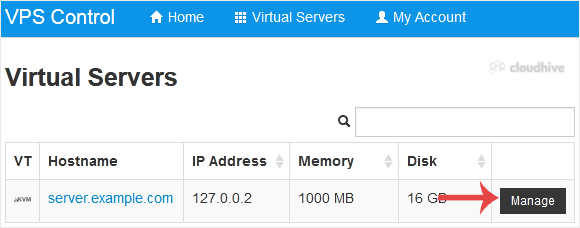
You can change the hostname in SolusVM 1.1. Log in to your SolusVM 1 Control Panel.2. If you have multiple VPSs, select the appropriate one.3. Scroll down. Under the Hostname tab, enter your hostname in the text field. Then click on Change.4. A reboot is required so that the saved changes can tak...
Tutorial
How to Change the Disk Driver to Virtio or IDE in SolusVM 1
In this tutorial, we will learn how to switch your disk driver to Virtio or IDE in SolusVM 1. We recommend changing the disk driver to Virtio or IDE before installing the operating system. Only change this before installing/reinstalling the OS.1. Log in to your SolusVM 1 Control Panel.2. If you h...
Tutorial
How to Change the Network Card to Virtio, Intel PRO, or Realtek in SolusVM 1
You can change your network card from the SolusVM 1 control panel. 1. Log in to your SolusVM 1 Control Panel.2. If you have multiple VPSs, select the appropriate one.3. Scroll down. Under the Settings tab, you can find the Network Card option. Select the appropriate network card from the drop-dow...
Tutorial
How to Enable Disable APIC, ACPI, VNC in SolusVM 1
SolusVM 1 allows you to enable or disable VNC, PAE, APIC, and ACPI.1. Log in to your SolusVM 1 Control Panel.2. If you have multiple VPSs, then select the appropriate one.3. Scroll down. Under the Settings tab you can find APIC, ACPI, VNC or PAE. If you want to turn off VNC, select the Off option...