
DirectAdmin(DA) is a Commercial Hosting Control Panel used to sell shared and reseller hosting accounts.
What are the requirements?
- Fresh CentOS, AlmaLinux, Ubuntu, or Debian installed on your VPS/Server.
How to install DirectAdmin?
Step 1: The first step is to log in to your root account using SSH or any other way.
If you have an IP-based license, run the below command.
bash <(curl -LSs https://download.directadmin.com/setup.sh || curl -LSs https://download-alt.directadmin.com/setup.sh) 'auto'
For a key-based license, execute the following command with your license key.
bash <(curl -LSs https://download.directadmin.com/setup.sh || curl -LSs https://download-alt.directadmin.com/setup.sh) 'Provided license key should go here'
Once the installation starts, it may take from 20 to 30 minutes to complete.
Step 2: After the installation is done, it will display the login credentials and the URL on-screen. You can access it by changing the URL in your browser to http://IP-Address:2222 (Replace IP-Address text with your server IP or hostname).
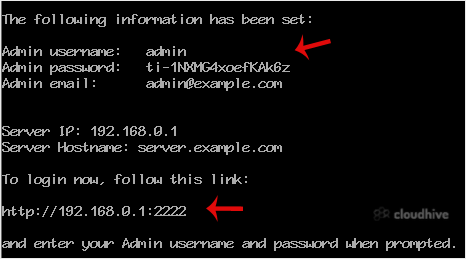
Congratulations, you have successfully installed the DirectAdmin control panel.