
How to Install a WordPress Theme Manually

SShaltai-Boltai April 26, 2026 2 min read 0 views
How to Install a WordPress Theme Manually

You can easily install a WordPress theme and activate it manually. Please, follow the steps below to do so.


1. Log in to the WordPress dashboard.

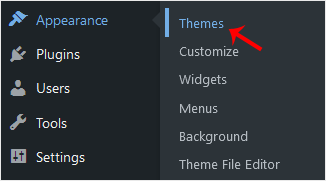
2. From the Dashboard menu, go to Appearance and click on Themes.

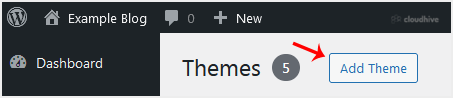
3. Click on Add Theme.

4. Choose Upload Theme.


5.
Click on Browse and choose the theme from your computer. Click on Install Now.


6. It will take a few moments to install. After that, click on Activate.


Congratulations, you have installed and activated a new WordPress theme.

//RELATED ARTICLESALL ARTICLES →
April 26, 2026 2 min read 0

How to Change Hostname in SolusVM 2

You can change the hostname in SolusVM 2.1. Log in to your SolusVM 2 Control Panel. 2. Under Projects, click on the project that contains your VPS. 3. Click on the appropriate VPS. 4. Click on the Edit icon at the top right side. Enter your new hostname, then click Save. 5. A reboot is required s...

SShaltai-Boltai Read more
April 26, 2026 2 min read 0

How to Enable or Disable PPP in SolusVM 2

PPP means Point-to-Point Protocol. It is mainly used for older types of VPNs like PPTP. When PPP is enabled, it allows your VPS to send and receive data securely over that connection. If you do not have such use then you can keep it stay disabled.1. Log in to your SolusVM 2 Control Panel. 2. Unde...

SShaltai-Boltai Read more
April 26, 2026 2 min read 0

How to Enable or Disable TUN/TAP in SolusVM 2

SolusVM 2 allows you to enable or disable TUN/TAP.1. Log in to your SolusVM 2 Control Panel. 2. Under Projects, click on the project that contains your VPS. 3. Click on the appropriate VPS. 4. Click on the Settings tab. 5. Toggle TUN/TAP to enable it, then click Change to proceed. 6. After making...

SShaltai-Boltai Read more
April 26, 2026 2 min read 0

How to Start/Boot Your VPS in SolusVM 2

If your VPS is down/offline, you can start it using SolusVM 2.1. Log in to your SolusVM 2 Control Panel. 2. Under Projects, click on the project that contains your VPS. 3. Click on the appropriate VPS. 4. Click on Start.It may take some time for the VPS to start.

SShaltai-Boltai Read more