
 Tutorial
How to Check VPS Specifications and Virtualization Info in Virtualizor
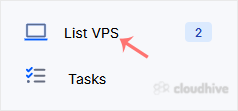
You can check VPS specifications such as RAM, disk space, virtualization, IP Address, etc., from the Virtualizor Control Panel. 1. Log in to your Virtualizor Control Panel. 2. From the left side panel, click on List VPS. 3. Under Information you can see the allocated RAM, CPU cores, disk space, a...
 Tutorial
How to Set a Preferred Payment Method in PayPal
With multiple Debit or Credit cards, you can set your proffered payment method in PayPal. 1. Log in to your PayPal account. 2. On top of the menu, click on Wallet. 3. Click on the card you wish to set up as the preferred payment method from the left side. 4. Find Set as preferred and click on it....
Tutorial
How to Remove a Debit or Credit Card From PayPal
Follow this tutorial to remove your Debit or Credit Card from your PayPal account. 1. Log in to your PayPal account. 2. On top of the menu, click on Wallet. 3. Click on the card you want to remove from the left side. 4. Scroll down and click on Remove Card. 5. Confirm with Yes or Remove This Card...
 Tutorial
How to Cancel an Automatic PayPal Subscription
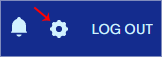
You can cancel pre-approved, automatic payments, or a subscription in your PayPal account. 1. Log in to your PayPal account. 2. Click on the settings icon. 3. Go to the Payments menu and click on Automatic payments. 4. Tick-mark Show Active. If there is an active subscription, it will be displaye...
Tutorial
How to Check Your Automatic Subscriptions in PayPal
In this tutorial, you will learn how to check your automatic subscriptions in PayPal. This helps you manage recurring payments easily. 1. Log in to your PayPal account. 2. Click on the settings icon. 3. Go to the Payments tab and click on Automatic payments. 4. Tick-mark Show Active. If there is ...
 Tutorial
How to Remove a Redirect From Your Website Using DirectAdmin
You can easily remove it if you have previously created a redirect in DirectAdmin. 1. Log in to your DirectAdmin Account. 2. In the Account Manager section, click on Site Redirection. Alternatively, type Site Redirection in the search bar, and the option will appear. Click on it. 3. Under Local U...
 Tutorial
How to Check or Change Server Time via WHM Root
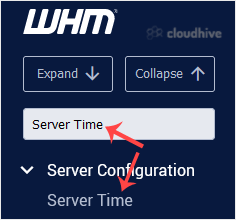
If you want to change the server time, you can easily do it from WHM Host Manager. 1. Log in to your WHM Root Account. 2. Go to Server Configuration >> Server Time or type Server Time in the menu filter box. The option will appear. Click on it. 3. You can check the already configured time u...
 Tutorial
How to Change the Default Nameservers in the WHM Root
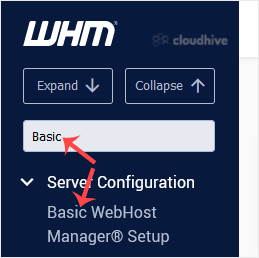
You can change the default nameservers in your WHM Root Account. Note: Root access is required. You cannot change the root accounts default nameservers with a normal WHM Reseller account.1. Log in to your WHM Root Account. 2. Go to Server Configuration >> Basic WebHost Manager Setup or type...
 Tutorial
How to Remove a Feature List from WHM
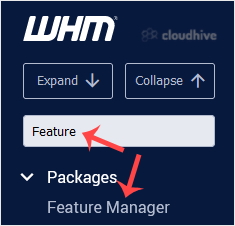
Follow this tutorial if you have a feature list you don't need and want it removed. 1. Log in to your WHM Account. 2. Go to Packages >> Feature Manager or type Feature Manager in the menu filter box. The option will appear. Click on it. 3. Under Manage feature list, choose the feature list ...
Tutorial
How to Create a Feature List in WHM
You can create a feature list from your WHM Account. Feature lists allow you to provide a customized plan with specific features only.1. Log in to your WHM Account. 2. Go to Packages >> Feature Manager or type Feature Manager in the menu filter box. The option will appear. Click on it. 3. I...
 Tutorial
How to Delete a Package in WHM
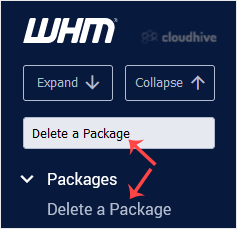
You can remove the hosting package of your account, or, should you have root access, you can also remove the packages of other users from WHM.1. Log in to your WHM Account. 2. Go to Packages >> Delete a Package or type Delete a Package in the menu filter box. The option will appear. Click o...
 Tutorial
How to Edit a Hosting Package in WHM
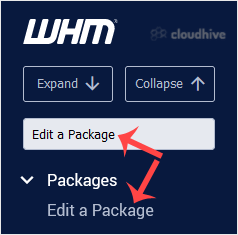
You can edit the hosting package of your account. With root access, you can edit the packages of any user. 1. Log in to your WHM Account. 2. Go to Packages >> Edit a Package or type Edit a Package in the menu filter box. The option will appear. Click on it. 3. Select the package you want to...