
How to Delete a Package in WHM Tutorial

How to Delete a Package in WHM

You can remove the hosting package of your account, or, should you have root access, you can also remove the packages of other users from WHM.


1. Log in to your WHM Account.


2. Go to Packages >> Delete a Package or type Delete a Package in the menu filter box. The option will appear. Click on it.
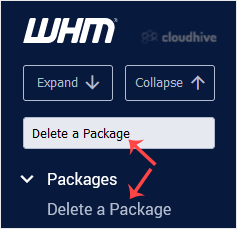


3. Under Delete a Package, select a package you want to remove and click on Delete.
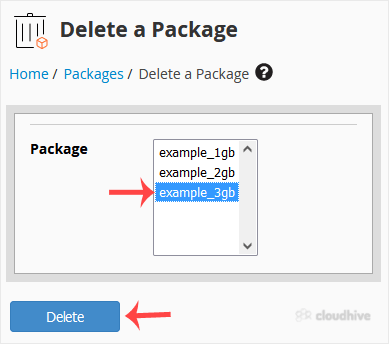


Congratulations, you have successfully removed the selected package.

Share: Twitter LinkedIn WhatsApp

Expert Knowledge

Articles written by certified WHMCS developers and hosting professionals.

Regularly Updated

Fresh content published regularly to keep you up to date with the latest.

Community Focused

Content built around real questions and challenges from our community.

Actionable Tips

Every article includes step-by-step guides you can apply immediately.