

How to Check Your Automatic Subscriptions in PayPal

SShaltai-Boltai April 26, 2026 2 min read 0 views
How to Check Your Automatic Subscriptions in PayPal

In this tutorial, you will learn how to check your automatic subscriptions in PayPal. This helps you manage recurring payments easily.

1. Log in to your PayPal account.

2. Click on the settings icon.

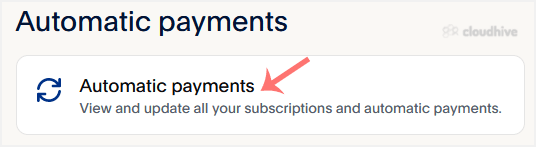
3. Go to the Payments tab and click on Automatic payments.
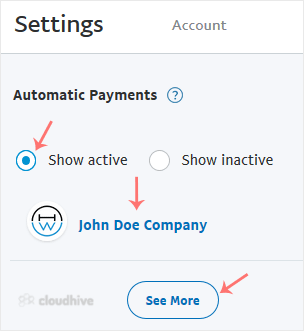
4. Tick-mark Show Active. If there is an active subscription, it will be displayed. In the case of many subscriptions, click on See More.
Now you know how to check your automatic subscriptions in PayPal, giving you full control over your recurring payments.

//RELATED ARTICLESALL ARTICLES →
April 26, 2026 2 min read 0

How to Change Hostname in SolusVM 2

You can change the hostname in SolusVM 2.1. Log in to your SolusVM 2 Control Panel. 2. Under Projects, click on the project that contains your VPS. 3. Click on the appropriate VPS. 4. Click on the Edit icon at the top right side. Enter your new hostname, then click Save. 5. A reboot is required s...

SShaltai-Boltai Read more
April 26, 2026 2 min read 0

How to Enable or Disable PPP in SolusVM 2

PPP means Point-to-Point Protocol. It is mainly used for older types of VPNs like PPTP. When PPP is enabled, it allows your VPS to send and receive data securely over that connection. If you do not have such use then you can keep it stay disabled.1. Log in to your SolusVM 2 Control Panel. 2. Unde...

SShaltai-Boltai Read more
April 26, 2026 2 min read 0

How to Enable or Disable TUN/TAP in SolusVM 2

SolusVM 2 allows you to enable or disable TUN/TAP.1. Log in to your SolusVM 2 Control Panel. 2. Under Projects, click on the project that contains your VPS. 3. Click on the appropriate VPS. 4. Click on the Settings tab. 5. Toggle TUN/TAP to enable it, then click Change to proceed. 6. After making...

SShaltai-Boltai Read more
April 26, 2026 2 min read 0

How to Start/Boot Your VPS in SolusVM 2

If your VPS is down/offline, you can start it using SolusVM 2.1. Log in to your SolusVM 2 Control Panel. 2. Under Projects, click on the project that contains your VPS. 3. Click on the appropriate VPS. 4. Click on Start.It may take some time for the VPS to start.

SShaltai-Boltai Read more