
You can deactivate and delete unused plugins from the WordPress dashboard.
1. Log in to the WordPress dashboard.
2. From the Dashboard menu, go to Plugins and click on Installed Plugins.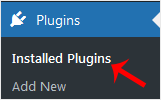
3. If you want to deactivate the Hello Dolly plugin, click on Deactivate, which appears below the plugin's name.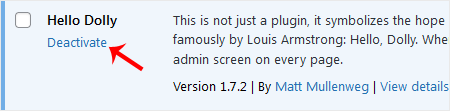
How to Delete a Plugin in WordPress?
Once the plugin is deactivated, the delete option will appear.
Click on Delete, displayed at the bottom of the deactivated plugin's name. Confirm with OK to remove it.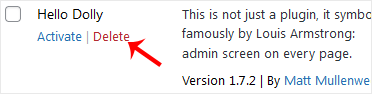
The plugin has been deactivated and deleted.