
 Security
How to Change the VPS Root/Admin Password in Virtualizor
You can change the root/admin password of your VPS operating system using Virtualizor. 1. Log in to your Virtualizor Control Panel. 2. From the left side panel, click on List VPS. 3. Hover your mouse on the appropriate VPS, and that line will be highlighted. Then click on the Wrench icon in the h...
Tutorial
How to Change Hostname in Virtualizor
You can change the hostname in Virtualizor. 1. Log in to your Virtualizor Control Panel. 2. From the left side panel, click on List VPS. 3. Hover your mouse on the appropriate VPS, and that line will be highlighted. Then click on the Wrench icon in the highlighted line. 4. Click on the Settings t...
Tutorial
How to Enable Disable APIC, ACPI, VNC in Virtualizor
Virtualizor allows you to enable or disable VNC, APIC, and ACPI. 1. Log in to your Virtualizor Control Panel. 2. From the left side panel, click on List VPS. 3. Hover your mouse on the appropriate VPS, and that line will be highlighted. Then click on the Wrench icon in the highlighted line. 4. Cl...
Security
How to Manually Install/Reinstall an OS Using Virtualizor for a Customized Installation
The Virtualizor's automatic reinstall option does not allow you to modify or create a custom partition. However, you can create such a partition through a manual installation/reinstallation of an OS. You can follow these instructions to install/reinstall an OS manually. 1. Log in to your Virtuali...
Security
How to Reinstall an OS Using the Virtualizor Automatic OS-Reinstaller
You can easily Install/Reinstall the operating system using the Virtualizor. However, note that this option will destroy all the data on your VPS. 1. Log in to your Virtualizor Control Panel. 2. From the left side panel, click on List VPS. 3. Hover your mouse on the appropriate VPS, and that line...
Security
How to Access VPS via VNC in Virtualizor
You can access your VPS via VNC in an emergency, such as when a firewall blocks your IP, the Internet connection on the VPS is not working, and you cannot access SSH. Also, you can use VNC for OS installation/reinstallation. 1. Log in to your Virtualizor Control Panel. 2. From the left side panel...
Tutorial
How to Start/Boot Your VPS in Virtualizor
If your VPS is down/offline, you can start it using Virtualizor. 1. Log in to your Virtualizor Control Panel. 2. From the left side panel, click on List VPS. 3. Hover your mouse on the appropriate VPS, and that line will be highlighted. Then click on the Wrench icon in the highlighted line. 4. On...
cPanel
How to Forcefully or Gracefully Shut Down the VPS in Virtualizor
You can shut down the VPS in two ways - forcefully or gracefully in Virtualizor. How to Gracefully shut down the VPS in Virtualizor? 1. Log in to your Virtualizor Control Panel. 2. From the left side panel, click on List VPS. 3. Hover your mouse on the appropriate VPS, and that line will be highl...
cPanel
How to Reboot/Restart VPS in Virtualizor
You can restart VPS via the command line or Virtualizor. How to Reboot/Restart a VPS via Virtualizor? 1. Log in to your Virtualizor Control Panel. 2. From the left side panel, click on List VPS. 3. Hover your mouse on the appropriate VPS, and that line will be highlighted. Click on the Wrench ico...
 Security
How to Change Your Virtualizor Account Password
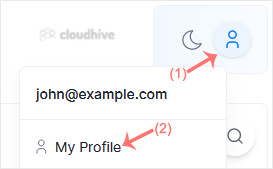
If you can access your Virtualizor VPS control panel, you can easily change your Virtualizor password. We recommend you to change the password frequently and use a strong one. 1. Log in to your Virtualizor Control Panel. 2. From the top right-hand side, click on Profile Avatar and navigate to My ...
Tutorial
How to Check VPS Specifications and Virtualization Info in Virtualizor
You can check VPS specifications such as RAM, disk space, virtualization, IP Address, etc., from the Virtualizor Control Panel. 1. Log in to your Virtualizor Control Panel. 2. From the left side panel, click on List VPS. 3. Under Information you can see the allocated RAM, CPU cores, disk space, a...
cPanel
How to Check VPS Online or Offline Status in Virtualizor
Do you want to check your Virtualizor VPS status and determine whether the VPS is offline or online? You can examine the client area or the Virtualizor Control Panel. 1. Log in to your Virtualizor Control Panel. 2. From the left side panel, click on List VPS. 3. Under Status, if it shows Online, ...