
 cPanel
How to Redirect an Add-on Domain in cPanel
You can redirect your add-on domain to another domain.1. Log in to your cPanel account. 2. In the Domains section, click on Redirects. 3. Under Add Redirect, you should enter the following details and choose the appropriate options. Type: Choose Permanent (301) or Temporary (302). https?://(www.)...
 cPanel
How to Remove an Add-on Domain in cPanel
If you no longer need an add-on domain in cPanel, you can remove it easily to free up space and keep your account organized. 1. Log in to your cPanel account. 2. In the Domains section, click on Domains. 3. Locate the addon domain you want to remove and click Manage next to it. 4. Scroll down, cl...
cPanel
How to Create Addon Domains in cPanel
Before adding the addon domain, point your addon domain nameservers to your primary domain nameservers and wait for domain propagation. It usually takes between 12 and 24 hours for the changes to take effect. 1. Log in to your cPanel account. 2. In the Domains section, click on Domains. 3. Click ...
cPanel
How to Remove Parked Domains/Aliases in cPanel
Parked domains, also known as aliases, are additional domains that point to your main website. If you no longer need one, you can easily remove it in cPanel. 1. Log in to your cPanel account. 2. In the Domains section, click on Domains. 3. In the List of Domains, locate the alias domain you want ...
cPanel
How to Create an Alias or Park a Domain in cPanel
An Alias domain, formerly known as a parked domain, lets you create a mirror of your primary domain. This means visitors using the new address will see the same content as your main website. Note: The domain you want to use as an Alias must have its DNS records pointed to our server.1. Log in to ...
 cPanel
How to Update the DNS Nameservers at GoDaddy
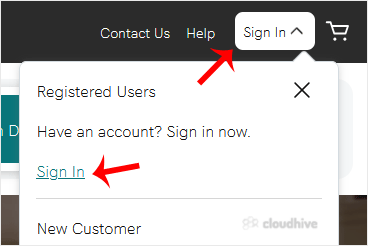
You can find our nameservers in your hosting welcome email. You need to update your domain nameservers to our nameservers.If your domain is registered at GoDaddy, you should follow this tutorial to update your domain's Nameservers. 1. Open Godaddy website and click on Sign In. Under "Registered U...
 cPanel
How to Update the DNS Nameservers at NetEarthOne or LogicBoxes-Based Registrars
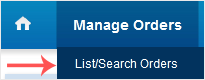
You can find our nameservers in your hosting welcome email. You need to update your domain nameservers to our nameservers. If your domain is registered on NetEarthOne or LogicBoxes-based registrars, you should follow this tutorial to update your domain's Nameservers. 1. Open the NetEarthOne.com o...
 cPanel
How to Update the DNS Nameservers at Namecheap
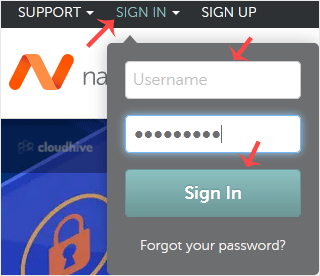
You can find our nameservers in your hosting welcome email. You need to update your domain nameservers to our nameservers.If your domain is registered on NameCheap, you should follow this tutorial to update your domain's Nameservers.1. Open the NameCheap.com website and click on Sign In. It will ...
 cPanel
How to Update the DNS Nameservers at DynaDot
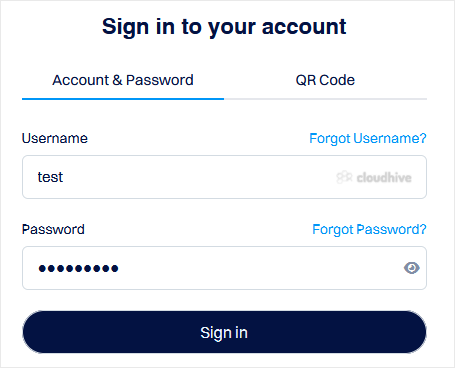
You can find our nameservers in your hosting welcome email. You need to update your domain nameservers to our nameservers.If your domain is registered on DynaDot, you should follow this tutorial to update your domain's Nameservers. 1. Open the DynaDot website and click on Login. It will redirect ...
 cPanel
How to Update the DNS Nameservers at Name.com
You can find our nameservers in your hosting welcome email. You need to update your domain nameservers to our nameservers. If your domain is registered on Name.com, you should follow this tutorial to update your domain's Nameservers. 1. Open the Name.com website and click on Log in. 2. Enter the ...
 cPanel
How to Add a User to a Database and Grant Privileges
When managing a database in cPanel, it is important to add a user and set the right permissions for secure access. It ensures that only authorized users can make changes or retrieve data, keeping your websites database safe. 1. Log in to your cPanel account. 2. In the Databases section, click on ...
cPanel
How to Create a Database Username in cPanel
A database username is important for connecting your website or application to the database. You can create a database username by following the steps below. 1. Log in to your cPanel account. 2. In the Databases section, click on Manage My Databases.3. Under Add New User, in the Username field, e...