
How to Remove an Add-on Domain in cPanel cPanel

How to Remove an Add-on Domain in cPanel

If you no longer need an add-on domain in cPanel, you can remove it easily to free up space and keep your account organized.

1. Log in to your cPanel account.


2. In the Domains section, click on Domains.


3. Locate the addon domain you want to remove and click Manage next to it.
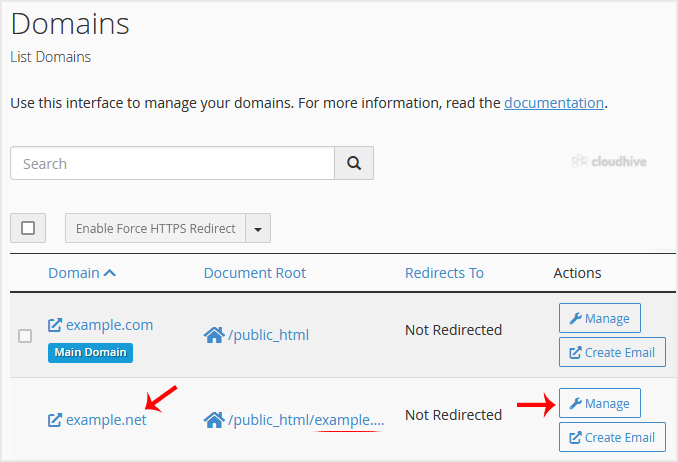

4. Scroll down, click on Remove Domain, and confirm the removal.


You should see a message that your addon domain has been removed.

Share: Twitter LinkedIn WhatsApp

Expert Knowledge

Articles written by certified WHMCS developers and hosting professionals.

Regularly Updated

Fresh content published regularly to keep you up to date with the latest.

Community Focused

Content built around real questions and challenges from our community.

Actionable Tips

Every article includes step-by-step guides you can apply immediately.