
How to Forcefully or Gracefully Shut Down the VPS in SolusVM 2

SShaltai-Boltai April 26, 2026 2 min read 0 views

You can shut down the VPS in two ways - forcefully or gracefully in SolusVM 2.

How to Gracefully shut down the VPS in SolusVM 2?


1.
Log in to your SolusVM 2 Control Panel.


2. Under Projects, click on the project that contains your VPS.
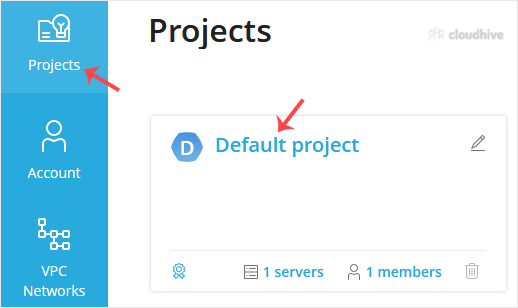
3. Click on the appropriate VPS.
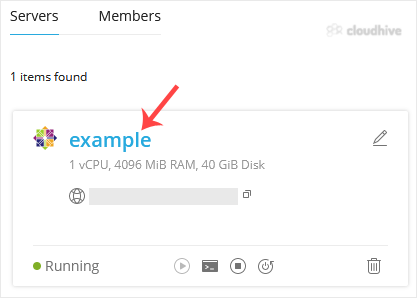


4. Click on Stop.


5. Click Yes to confirm.

It may take some time for the VPS to shut down. Then, it will display a message.


For forceful shutdown, you can click the Power Off option in SolusVM 2.


How to shut down the VPS via the Command Line?

(This option is similar to pulling the power cord from your computer, and there is a chance for data loss.)


1. Log in to your SSH Client.


2. Enter the following command:

poweroff


The VPS will shut down as soon as the command is executed.

//RELATED ARTICLESALL ARTICLES →
April 26, 2026 2 min read 0

How to Reboot/Restart VPS in SolusVM 2

You can restart VPS via the command line or SolusVM 2. How to Reboot/Restart a VPS via SolusVM 2? 1. Log in to your SolusVM 2 Control Panel. 2. Under Projects, click on the project that contains your VPS. 3. Click on the appropriate VPS. 4. Click on Restart located at the top right side.5. Choose...

SShaltai-Boltai Read more
April 26, 2026 2 min read 0

How to Check if Your VPS is Online or Offline in SolusVM 2

You can check the status of your SolusVM Virtual Private Server (VPS) to see if it is online or offline. You can find out VPS status from the client area or from the SolusVM 2 Control Panel.1. Log in to your SolusVM 2 Control Panel. 2. Under Projects, click on the project that contains your VPS. ...

SShaltai-Boltai Read more
April 26, 2026 2 min read 0

How to Log in to SolusVM 2 Control Panel

You can find the Control Panel URL, username (email address), and password in your VPS welcome email. SolusVM 2 login details example: Control Panel URL: https://server-hostname/login or use the IP address.Username: Your email address.Password: Your password. How to log in to SolusVM 2 Control Pa...

SShaltai-Boltai Read more
April 26, 2026 2 min read 0

How to Check for New Email in Outlook 2021

In this tutorial, we will show you how to check for new email messages in Outlook 2021. 1. Open Outlook 2021. 2. In the left panel. You can see a list of your email accounts, double-click on it to expand. 3. Click on Inbox, and it will start syncing. You are now ready to easily check for new emai...

SShaltai-Boltai Read more