
In this article, we will demonstrate how to use cPanel to set different PHP versions for individual domains. This can be beneficial, as some applications require specific versions to function correctly. For example, we will set PHP 8.3 on the Example2 domain and PHP 8.1 on the Example1 domain.
1. Log in to your cPanel account.
2. In the Software section, click on MultiPHP Manager.
3. Scroll down to the bottom of the page. Select your domain from the left side of the screen. You can view the PHP Version from the drop-down menu on the right. Please, select the appropriate PHP version from it and click on Apply.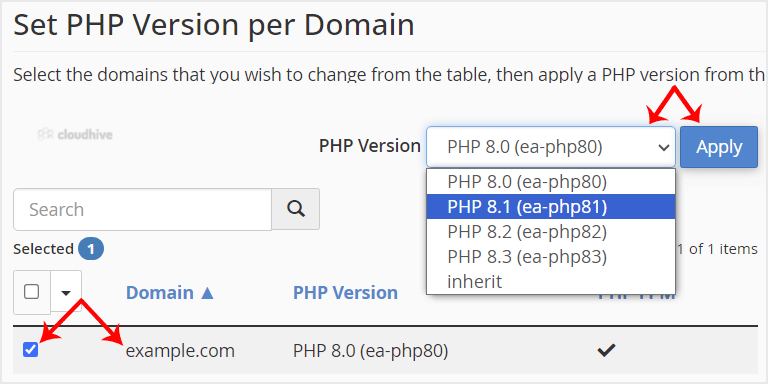
4. Now we will set PHP 8.3 on Example2. Scroll down and select the example2 domain. Then choose the PHP version as 8.3 and click apply.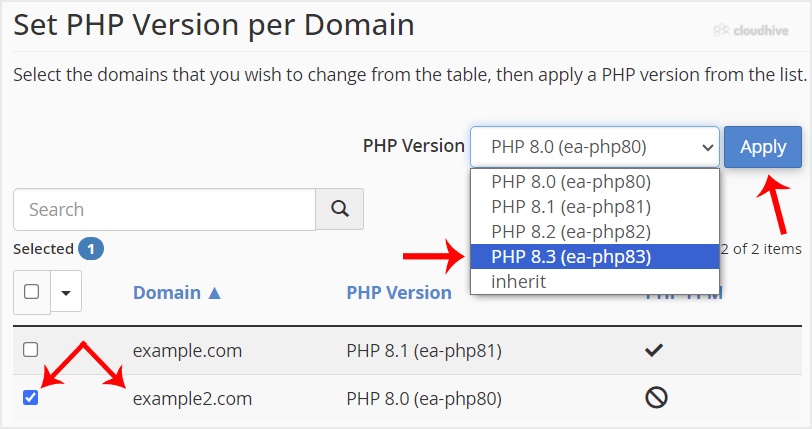
Congratulations, both of your domains are now using different PHP versions.