
In this tutorial, you will learn how to remove a domain pointer in DirectAdmin. This can be helpful if you no longer need the pointer or want to remove unused domains.
1. Log in to your DirectAdmin Account.
2. In the Account Manager section, click on Domain Pointers. Alternatively, type Domain Pointers in the search bar, and the option will appear. Click on it.
3. Under Domain Pointers, select the domain pointer you want to remove.
4. Click Delete, then confirm the deletion.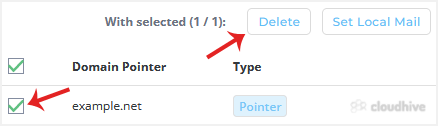
Your domain pointer should have been deleted successfully.