
How to Install SolusVM 1 Slave Node on Linux

SShaltai-Boltai April 26, 2026 2 min read 0 views
How to Install SolusVM 1 Slave Node on Linux

SolusVM is a popular VPS hosting control panel. SolusVM 1 Slave should be installed on a dedicated server..

What are the requirements?

- Fresh AlmaLinux 8, CentOS Stream 8, or CentOS 7 installed on your VPS/Server.

How to install SolusVM 1 Slave?

Step 1: Log in to SSH as a root account.

For AlmaLinux 8 or CentOS Stream 8, run the following command:

curl -o installer https://files.soluslabs.com/solusvmphp7/install/installer && chmod +x installer && ./installer

For CentOS 7, execute the following command instead:

curl -o install.sh https://files.solusvm.com/install.sh && sh install.sh 


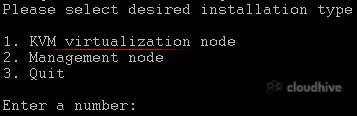
Step 2: For CentOS 7, it will show you an option to choose virtualization. Most people prefer KVM or Xen. Select your preferred virtualization by typing the option number and pressing Enter.

Note: Select the KVM virtualization node option on CentOS Stream 8 or AlmaLinux 8.

Installation can take from 5 to 10 minutes.


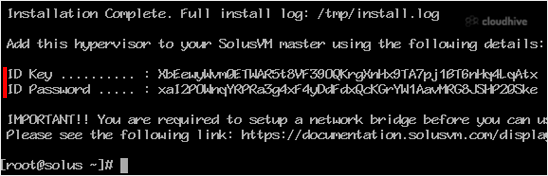
Step 3: Once it completes, it will show you the Slave keys and further instructions for your virtualization type. You can now use these keys to add a node to your SolusVM Master panel. You will need to have a SolusVM 1 Slave license for each node.

//RELATED ARTICLESALL ARTICLES →
April 26, 2026 2 min read 0

How to Forcefully or Gracefully Shut Down the VPS in SolusVM 2

You can shut down the VPS in two ways - forcefully or gracefully in SolusVM 2. How to Gracefully shut down the VPS in SolusVM 2? 1. Log in to your SolusVM 2 Control Panel. 2. Under Projects, click on the project that contains your VPS. 3. Click on the appropriate VPS. 4. Click on Stop.5. Click Ye...

SShaltai-Boltai Read more
April 26, 2026 2 min read 0

How to Reboot/Restart VPS in SolusVM 2

You can restart VPS via the command line or SolusVM 2. How to Reboot/Restart a VPS via SolusVM 2? 1. Log in to your SolusVM 2 Control Panel. 2. Under Projects, click on the project that contains your VPS. 3. Click on the appropriate VPS. 4. Click on Restart located at the top right side.5. Choose...

SShaltai-Boltai Read more
April 26, 2026 2 min read 0

How to Check if Your VPS is Online or Offline in SolusVM 2

You can check the status of your SolusVM Virtual Private Server (VPS) to see if it is online or offline. You can find out VPS status from the client area or from the SolusVM 2 Control Panel.1. Log in to your SolusVM 2 Control Panel. 2. Under Projects, click on the project that contains your VPS. ...

SShaltai-Boltai Read more
April 26, 2026 2 min read 0

How to Log in to SolusVM 2 Control Panel

You can find the Control Panel URL, username (email address), and password in your VPS welcome email. SolusVM 2 login details example: Control Panel URL: https://server-hostname/login or use the IP address.Username: Your email address.Password: Your password. How to log in to SolusVM 2 Control Pa...

SShaltai-Boltai Read more