
How to Increase or Decrease PHP Memory Limit via CloudLinux Selector in cPanel cPanel

How to Increase or Decrease PHP Memory Limit via CloudLinux Selector in cPanel

You can modify PHP Memory Limit as per your needs using CloudLinux PHP Selector in cPanel.

1. Log in to your cPanel account.

2. In the Software section, click on Select PHP Version.

3. Click on the Options menu.

Note: If the Options page shows an error related to the native PHP version, change it to a non-native version first.

4. Look for memory_limit and click on the drop-down option displayed in front of it. Then choose the appropriate limit as per your requirements.
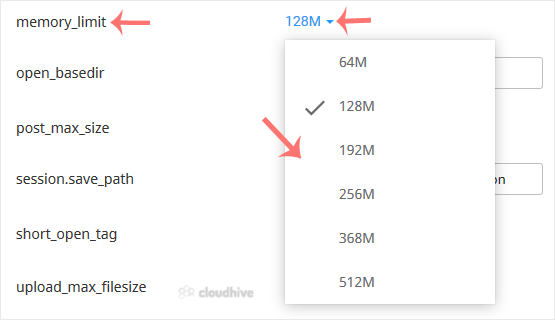
A message will appear stating that the memory limit has been modified.

Share: Twitter LinkedIn WhatsApp

Expert Knowledge

Articles written by certified WHMCS developers and hosting professionals.

Regularly Updated

Fresh content published regularly to keep you up to date with the latest.

Community Focused

Content built around real questions and challenges from our community.

Actionable Tips

Every article includes step-by-step guides you can apply immediately.