

How to Create a "User Level Email Filter" in cPanel

SShaltai-Boltai April 26, 2026 2 min read 0 views
How to Create a "User Level Email Filter" in cPanel

It is hard to stop spam email entirely but you can filter it, discard it, deliver it to the selected folder, etc.


How to Create a User Level Email Filter?


1. Log in to your cPanel account.

2. In the Email section, click on Email Filters.

3. Under Filters by Users, you can see all existing email accounts. Click on Manage Filters next to the appropriate one.
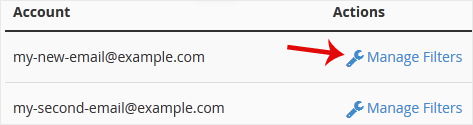

4. Click on Create a New Filter.


5. Enter a name for the filter in the Filter Name input box.

6. You can filter email with many options in the filter rules. If you want to deal with an email containing a word such as Lottery or other words, select Body in the first list box and select Contains in the second one.

7. From the Actions drop-down menu, select Discard Message.
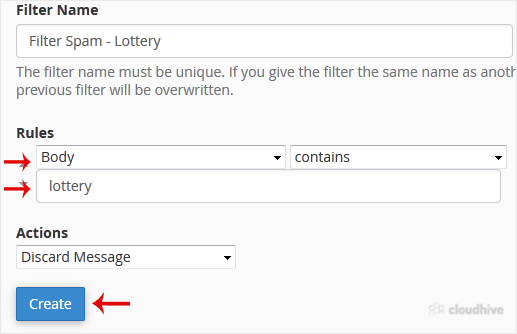


8. Now click on Create.

Your user level email filter is now set up in cPanel and will help keep your inbox clean.

//RELATED ARTICLESALL ARTICLES →
April 26, 2026 2 min read 0

How to Forcefully or Gracefully Shut Down the VPS in SolusVM 2

You can shut down the VPS in two ways - forcefully or gracefully in SolusVM 2. How to Gracefully shut down the VPS in SolusVM 2? 1. Log in to your SolusVM 2 Control Panel. 2. Under Projects, click on the project that contains your VPS. 3. Click on the appropriate VPS. 4. Click on Stop.5. Click Ye...

SShaltai-Boltai Read more
April 26, 2026 2 min read 0

How to Reboot/Restart VPS in SolusVM 2

You can restart VPS via the command line or SolusVM 2. How to Reboot/Restart a VPS via SolusVM 2? 1. Log in to your SolusVM 2 Control Panel. 2. Under Projects, click on the project that contains your VPS. 3. Click on the appropriate VPS. 4. Click on Restart located at the top right side.5. Choose...

SShaltai-Boltai Read more
April 26, 2026 2 min read 0

How to Check if Your VPS is Online or Offline in SolusVM 2

You can check the status of your SolusVM Virtual Private Server (VPS) to see if it is online or offline. You can find out VPS status from the client area or from the SolusVM 2 Control Panel.1. Log in to your SolusVM 2 Control Panel. 2. Under Projects, click on the project that contains your VPS. ...

SShaltai-Boltai Read more
April 26, 2026 2 min read 0

How to Log in to SolusVM 2 Control Panel

You can find the Control Panel URL, username (email address), and password in your VPS welcome email. SolusVM 2 login details example: Control Panel URL: https://server-hostname/login or use the IP address.Username: Your email address.Password: Your password. How to log in to SolusVM 2 Control Pa...

SShaltai-Boltai Read more