
How to Check for New Email in Thunderbird cPanel

How to Check for New Email in Thunderbird

Thunderbird is an email client software. You can work with it in the following way.


1. Open Thunderbird.


2. In the left panel, you can see a list of your email accounts. Click on Inbox or if it is hidden, click on your email. It will expand to show the inbox, the trash list, etc.
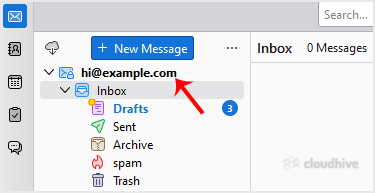


Another option is to right-click on the email address and choose Get Messages.


Thunderbird also automatically checks email every 5 to 10 minutes. It also does that automatically whenever you open the program.

Share: Twitter LinkedIn WhatsApp

Expert Knowledge

Articles written by certified WHMCS developers and hosting professionals.

Regularly Updated

Fresh content published regularly to keep you up to date with the latest.

Community Focused

Content built around real questions and challenges from our community.

Actionable Tips

Every article includes step-by-step guides you can apply immediately.