
How to Change the Email Sending Limit in DirectAdmin

SShaltai-Boltai April 26, 2026 2 min read 0 views
How to Change the Email Sending Limit in DirectAdmin

If you have set the email sending limit while creating your email account, you can easily modify it. However, you cannot increase it higher than the limit set by your server administrator.

1. Log in to your DirectAdmin Account.


2. In the E-mail Manager section, click on E-mail Accounts. Alternatively, type E-mail Accounts in the search bar, and the option will appear. Click on it.


3. In the Email Accounts list, you will see the email address with a three-dot icon on the right side.
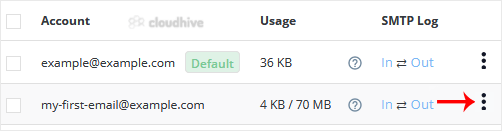

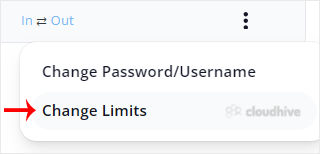
4. Click on the three-dot icon and choose Change Limits.

5. Modify the Send Limit to 200 or to as much as required. If you have the unlimited option available, choose it instead.
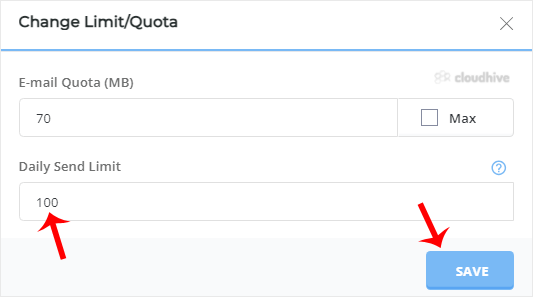

6. Click on Save.


Your email limit will be modified.

//RELATED ARTICLESALL ARTICLES →
April 26, 2026 2 min read 0

How to Forcefully or Gracefully Shut Down the VPS in SolusVM 2

You can shut down the VPS in two ways - forcefully or gracefully in SolusVM 2. How to Gracefully shut down the VPS in SolusVM 2? 1. Log in to your SolusVM 2 Control Panel. 2. Under Projects, click on the project that contains your VPS. 3. Click on the appropriate VPS. 4. Click on Stop.5. Click Ye...

SShaltai-Boltai Read more
April 26, 2026 2 min read 0

How to Reboot/Restart VPS in SolusVM 2

You can restart VPS via the command line or SolusVM 2. How to Reboot/Restart a VPS via SolusVM 2? 1. Log in to your SolusVM 2 Control Panel. 2. Under Projects, click on the project that contains your VPS. 3. Click on the appropriate VPS. 4. Click on Restart located at the top right side.5. Choose...

SShaltai-Boltai Read more
April 26, 2026 2 min read 0

How to Check if Your VPS is Online or Offline in SolusVM 2

You can check the status of your SolusVM Virtual Private Server (VPS) to see if it is online or offline. You can find out VPS status from the client area or from the SolusVM 2 Control Panel.1. Log in to your SolusVM 2 Control Panel. 2. Under Projects, click on the project that contains your VPS. ...

SShaltai-Boltai Read more
April 26, 2026 2 min read 0

How to Log in to SolusVM 2 Control Panel

You can find the Control Panel URL, username (email address), and password in your VPS welcome email. SolusVM 2 login details example: Control Panel URL: https://server-hostname/login or use the IP address.Username: Your email address.Password: Your password. How to log in to SolusVM 2 Control Pa...

SShaltai-Boltai Read more