

How to Add an MX Record in cPanel

SShaltai-Boltai April 26, 2026 2 min read 0 views
How to Add an MX Record in cPanel

A mail exchanger record (MX record) is a record in the Domain Name System that specifies a mail server responsible for accepting email messages. You can add an MX Record using the cPanel's Zone Editor option.


1. Log in to your cPanel account.


2. In the Domains section, click on Zone Editor.


3. Under Domains, you can see many options below Actions.
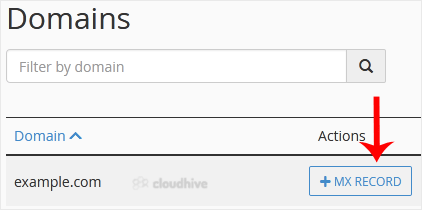


4. Click on the +MX Record, and a popup box will open. Please enter the required details in it.

Priority: The MX record is used for mail routing. It should have the lowest preference number, typically 0. You can use 0 for your mail routing record and 10 for the record validating that you own your domain.

Destination: Enter the domain name of your Mail Exchange. If you use an external mail server, enter the domain name of the external mail server. Alternatively, enter your local domain if you use a local mail server.
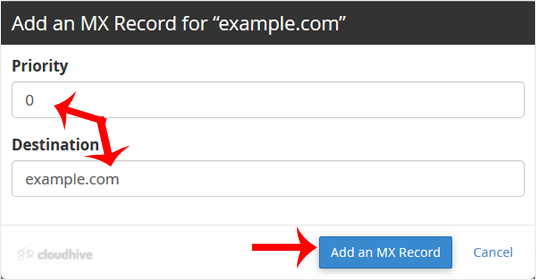
5. Now click on Add an MX Record.


If the record is added successfully, you will see a success message.

Note: It may take anywhere from 12 to 24 hours for the changes to take effect worldwide.

//RELATED ARTICLESALL ARTICLES →
April 26, 2026 2 min read 0

How to Forcefully or Gracefully Shut Down the VPS in SolusVM 2

You can shut down the VPS in two ways - forcefully or gracefully in SolusVM 2. How to Gracefully shut down the VPS in SolusVM 2? 1. Log in to your SolusVM 2 Control Panel. 2. Under Projects, click on the project that contains your VPS. 3. Click on the appropriate VPS. 4. Click on Stop.5. Click Ye...

SShaltai-Boltai Read more
April 26, 2026 2 min read 0

How to Reboot/Restart VPS in SolusVM 2

You can restart VPS via the command line or SolusVM 2. How to Reboot/Restart a VPS via SolusVM 2? 1. Log in to your SolusVM 2 Control Panel. 2. Under Projects, click on the project that contains your VPS. 3. Click on the appropriate VPS. 4. Click on Restart located at the top right side.5. Choose...

SShaltai-Boltai Read more
April 26, 2026 2 min read 0

How to Check if Your VPS is Online or Offline in SolusVM 2

You can check the status of your SolusVM Virtual Private Server (VPS) to see if it is online or offline. You can find out VPS status from the client area or from the SolusVM 2 Control Panel.1. Log in to your SolusVM 2 Control Panel. 2. Under Projects, click on the project that contains your VPS. ...

SShaltai-Boltai Read more
April 26, 2026 2 min read 0

How to Log in to SolusVM 2 Control Panel

You can find the Control Panel URL, username (email address), and password in your VPS welcome email. SolusVM 2 login details example: Control Panel URL: https://server-hostname/login or use the IP address.Username: Your email address.Password: Your password. How to log in to SolusVM 2 Control Pa...

SShaltai-Boltai Read more