
You can access your email account from DirectAdmin using two methods.
Method 1: (Automatic login)
1. Log in to your DirectAdmin Account.
2. In the E-mail Manager section, click on E-mail Accounts. Alternatively, type E-mail Accounts in the search bar, and the option will appear. Click on it.
3. Under the Email Account list, click the Sign-in icon next to the email address.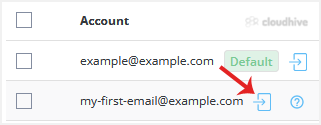
4. Your browser may prompt you to allow a popup window. Confirm it, and you will be re-directed to Webmail.
Method 2: (Email Username and Password are required)
1. Log in to your DirectAdmin Account.
2. In the Extra Features section, click on your preferred webmail. Alternatively, type Webmail in the search bar, and the option will appear. Click on it.
3. Enter your full email address and password.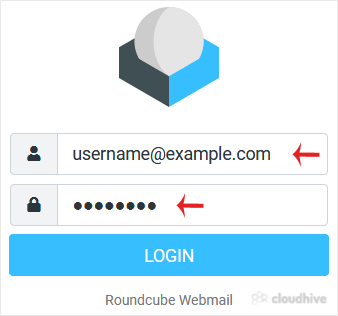
4. Click on Login.
You can manage your email account from the webmail reader.