
 cPanel
How to Install Composr via Softaculous in cPanel
Softaculous helps you install web applications very easy. Please, follow the steps below to install Composr. 1. Log in to your cPanel account. 2. In the Software section, click on Softaculous Apps Installer.3. cPanel will redirect you to the Softaculous interface.4. On the left side, type Composr...
cPanel
How to Install Pluck via Softaculous in cPanel
Softaculous helps you install web applications very easy. Please, follow the steps below to install Pluck. 1. Log in to your cPanel account. 2. In the Software section, click on Softaculous Apps Installer.3. cPanel will redirect you to the Softaculous interface.4. On the left side, type Pluck in ...
cPanel
How to Install Unclassified NewsBoard via Softaculous in cPanel
Softaculous helps you install web applications very easy. Please, follow the steps below to install Unclassified NewsBoard. 1. Log in to your cPanel account. 2. In the Software section, click on Softaculous Apps Installer.3. cPanel will redirect you to the Softaculous interface.4. On the left sid...
cPanel
How to Install TangoBB Forum via Softaculous in cPanel
Softaculous helps you install web applications very easy. Please, follow the steps below to install Unclassified TangoBB. 1. Log in to your cPanel account. 2. In the Software section, click on Softaculous Apps Installer.3. cPanel will redirect you to the Softaculous interface.4. On the left side,...
 cPanel
How to Install cPanel
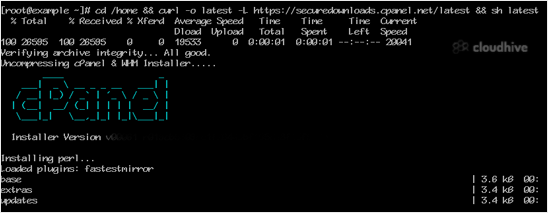
cPanel is the #1 Hosting Control Panel in the web hosting industry. You can easily install it.What are the requirements?- Fresh Ubuntu or AlmaLinux OS installed on your VPS/Server.How to install cPanel?1. Log in to your VPS/Server via the SSH Client.2. Copy the following command and paste it into...
 cPanel
How to Forcefully or Gracefully Shut Down the VPS in SolusVM 1
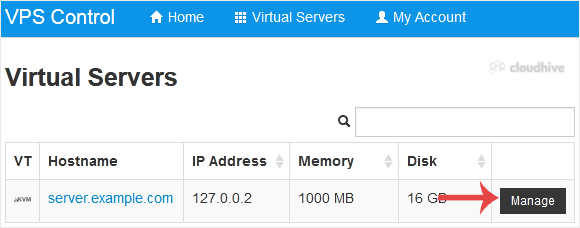
You can shut down the VPS in two ways - forcefully or gracefully in SolusVM 1. How to Gracefully shut down the VPS in SolusVM 1? 1. Log in to your SolusVM 1 Control Panel.2. If you have multiple VPSs, select the appropriate one.3. Click on Shutdown.4. Click Yes to confirm. It may take some time f...
cPanel
How to Reboot/Restart VPS in SolusVM 1
You can restart VPS via the command line or SolusVM 1. How to Reboot/Restart a VPS via SolusVM 1? 1. Log in to your SolusVM 1 Control Panel.2. If you have multiple VPSs, select the appropriate one.3. Click on Reboot.4. Choose Yes to confirm.It may take some time to reboot. Then, it will display t...
 cPanel
How to Change the SolusVM 1 Control Panel Password
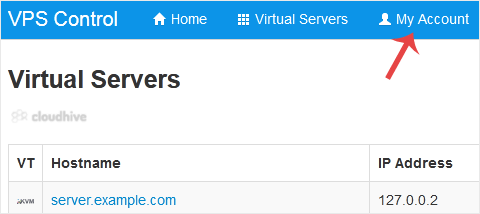
If you can access your SolusVM 1 VPS control panel, you can easily change your SolusVM 1 password. We recommend changing the password every three months.1. Log in to your SolusVM 1 Control Panel. 2. From the top navigation bar, click on My Account.3. Under Change Account Password enter the follow...
cPanel
How to Enable or Disable the SolusVM 1 VPS Login Alert
Whenever you log in to your VPS control panel, you will receive a login email alert. You can disable this function from the SolusVM 1. However, we recommend that you enable the feature for security reasons. 1. Log in to your SolusVM 1 Control Panel. 2. From the top navigation bar, click on My Acc...
cPanel
How to Change the SolusVM 1 Account Email Address
If you want to update your SolusVM 1 VPS Control panel email address, follow this instruction.1. Log in to your SolusVM 1 Control Panel.2. From the top navigation bar, click on My Account. 3. Under Account Settings, enter your new email address in the email field and click on Update Settings.It s...
cPanel
How to Check VPS Online or Offline Status in SolusVM 1
You can check your SolusVM VPS status and determine whether the VPS is offline or online. You can find out VPS status from the client area or from the SolusVM 1 Control Panel.1. Log in to your SolusVM 1 Control Panel. 2. If you have multiple VPSs, select the appropriate one. 3. Under the VPS host...
 cPanel
How to Log in to SolusVM 1 Control Panel
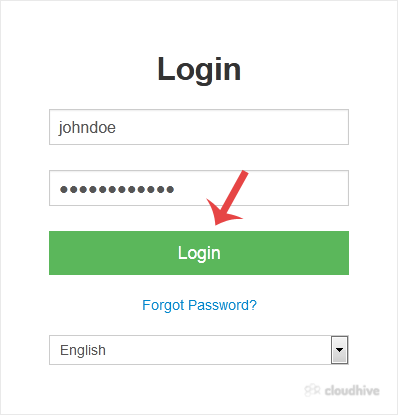
You can find the Control Panel URL, username and password in your VPS welcome email. SolusVM 1 Login details example: Control Panel URL: https://cp.example.com or with the IP Address.Username: vmuser123 or johndoe.Password: example. How to log in to SolusVM 1 Control Panel? 1. Open VPS Control Pa...