
 cPanel
How to Update the DNS Nameservers at 123-Reg
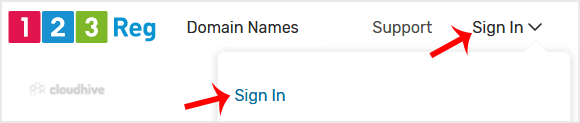
You can find our nameservers in your hosting welcome email. You need to update your domain nameservers to our nameservers.If your domain is registered on 123-Reg, you should follow this tutorial to update your domain's Nameservers.1. Open the 123 Reg website and click on Sign In. Then, click on "...
 cPanel
How to Install Beehive Forum via Softaculous in cPanel
Softaculous helps you install web applications very easy. Please, follow the steps below to install Beehive. 1. Log in to your cPanel account. 2. In the Software section, click on Softaculous Apps Installer.3. cPanel will redirect you to the Softaculous interface.4. On the left side, type Beehive...
cPanel
How to Install miniBB Forum via Softaculous in cPanel
Softaculous helps you install web applications very easy. Please, follow the steps below to install miniBB Forum. 1. Log in to your cPanel account. 2. In the Software section, click on Softaculous Apps Installer.3. cPanel will redirect you to the Softaculous interface.4. On the left side, type mi...
cPanel
How to Install bbPress Forum via Softaculous in cPanel
Softaculous helps you install web applications very easy. Please, follow the steps below to install bbPress Forum. 1. Log in to your cPanel account. 2. In the Software section, click on Softaculous Apps Installer.3. cPanel will redirect you to the Softaculous interface.4. On the left side, type b...
cPanel
How to Install Phorum Forum via Softaculous in cPanel
Softaculous helps you install web applications very easy. Please, follow the steps below to install Phorum Forum. 1. Log in to your cPanel account. 2. In the Software section, click on Softaculous Apps Installer.3. cPanel will redirect you to the Softaculous interface.4. On the left side, type Ph...
cPanel
How to Install FluxBB Forum via Softaculous in cPanel
Softaculous helps you install web applications very easy. Please, follow the steps below to install FluxBB Forum. 1. Log in to your cPanel account. 2. In the Software section, click on Softaculous Apps Installer.3. cPanel will redirect you to the Softaculous interface.4. On the left side, type Fl...
cPanel
How to Install XMB Forum via Softaculous in cPanel
Softaculous helps you install web applications very easy. Please, follow the steps below to install XMB Forum. 1. Log in to your cPanel account. 2. In the Software and Services section, click on Softaculous Icon.3. cPanel will redirect you to the Softaculous interface.4. On the left side, type XM...
cPanel
How to Install PunBB Forum via Softaculous in cPanel
Softaculous helps you install web applications very easy. Please, follow the steps below to install PunBB Forum. 1. Log in to your cPanel account. 2. In the Software section, click on Softaculous Apps Installer.3. cPanel will redirect you to the Softaculous interface.4. On the left side, type Pun...
cPanel
How to Install FlatPress via Softaculous in cPanel
Softaculous helps you install web applications very easy. Please, follow the steps below to install FlatPress. 1. Log in to your cPanel account. 2. In the Software section, click on Softaculous Apps Installer.3. cPanel will redirect you to the Softaculous interface.4. On the left side, type FlatP...
cPanel
How to Install PivotX via Softaculous in cPanel
Softaculous helps you install web applications very easy. Please, follow the steps below to install PivotX. 1. Log in to your cPanel account. 2. In the Software section, click on Softaculous Apps Installer.3. cPanel will redirect you to the Softaculous interface.4. On the left side, type PivotX i...
cPanel
How to Install Chyrp via Softaculous in cPanel
Softaculous helps you install web applications very easy. Please, follow the steps below to install Chyrp. 1. Log in to your cPanel account. 2. In the Software section, click on Softaculous Apps Installer. 3. cPanel will redirect you to the Softaculous interface. 4. On the left side, type Chyrp i...
cPanel
How to Install Nucleus via Softaculous in cPanel
Softaculous helps you install web applications very easy. Please, follow the steps below to install Nucleus. 1. Log in to your cPanel account. 2. In the Software section, click on Softaculous Apps Installer. 3. cPanel will redirect you to the Softaculous interface. 4. On the left side, type Nucle...