
How to Delete an Uncategorized Category in WordPress Tutorial

How to Delete an Uncategorized Category in WordPress

You cannot remove the Uncategorized category, but you can rename it.


1. Log in to the WordPress dashboard.


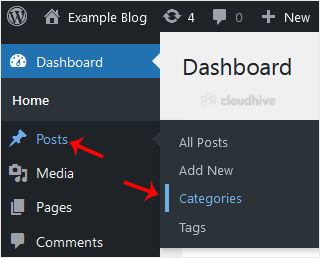
2. From the Dashboard menu, go to Posts and click on Categories.


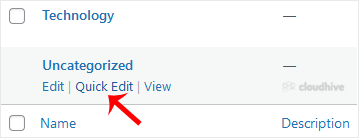
3. Hover your mouse on the Uncategorized option and click on Quick Edit.


4. Change its name and slug, and confirm with Update Category.
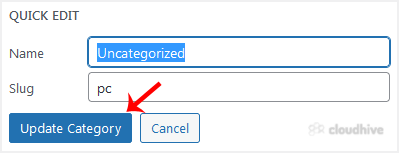

The Uncategorized category has been successfully renamed.

Share: Twitter LinkedIn WhatsApp

Expert Knowledge

Articles written by certified WHMCS developers and hosting professionals.

Regularly Updated

Fresh content published regularly to keep you up to date with the latest.

Community Focused

Content built around real questions and challenges from our community.

Actionable Tips

Every article includes step-by-step guides you can apply immediately.